Experience crystal clear audio with the lightweight Discover D711's single speaker. This deluxe wired headset is built sturdily enough to handle everyday use while integrating some of the latest features found in premium Discover headsets for exceptional performance.
The soft leatherette ear cushion reduces background noise, offering the kind of comfort and clarity you'd expect from high-quality Discover headsets while still allowing you to remain aware of your surroundings.
The quick disconnect
Experience crystal clear audio with the lightweight Discover D712's dual speakers. This deluxe wired headset is built sturdily enough to handle everyday use while the technology itself incorporates some of the latest features for headphones. The soft leatherette ear cushions help to reduce background noise while sitting comfortably against the ears so users can clearly hear callers on the other end.
The quick disconnect cable allows you to add various accessories to connect with a desk phone, m
The Discover Adapt 30 is one of the best value wireless headsets to seamlessly connect between your desk phone and computer, making it a great option when using software applications like Microsoft Teams, Zoom, and RingCentral.
The Adapt 30 brings uniqueness and modularity (interchangeable headband) to the business headset space, offering flexibility and longevity that you won’t find in other headset brands.
More Years Of Use & More Flexibility:
Out of the box the Discover Adapt 30 wirele
Before choosing a wired or wireless headset to go with your Cisco corded or cordless phone, you'll want to know the best headsets that are compatible. For more headsets compatible with office phones, visit the office headset compatibility guide: compatibility made easyHow to use the Cisco headset compatibility guide:
Find the make/model of your phone
Choose if you prefer a wired or wireless headset
If choosing a wired headset, you'll see the compatible adapter that will also be needed. For wireless, you can add the optional compatible accessory (DHS11, DHS20, DHS24, DHL110) to enable remote call answering (most customers add this accessory)
FAQ
Q: Why do I have to purchase a separate adapter to go with a wired headset for my Cisco phone? A: Being that there's so many different phones available, headset manufacturers have to make various different cables, depending which model of phone you're connecting to. Q: How come I have to purchase a separate accessory to answer/end calls away from my Cisco phone with a wireless headset? A: Out of the box either wireless headset is compatible, but in order to answer/end calls away from your desk, the recommended accessory will be required. Q: How do I find compatibility for other desk phone brands? A: Visit the office headset compatibility guide: compatibility made easy
Understanding Headset Terminology
Quick Disconnect: Out of the box this is the name of the cord that's on your Cisco compatible headset that connects to the direct connect cable. Direct Connect Cable: This cable connects from your Cisco headset to the headset port of your Cisco phone. Electronic Hook Switch: Otherwise known as an EHS cable, this accessory connects from a wireless headset charging base to your Cisco phone. Allowing you to answer/end calls when away from your phone. Handset Lifter: Like an EHS cable, a Handset Lifter also allows you to answer/end calls away from the phone, but physically picks up and hangs up your handset.
Compatible Cisco Wired Headsets Compared
How To Use Your Cisco Wired Headset
Simply plug the D102 or D106 direct connect cable into your compatible Discover D700 series wired headset, then plug the other end into your Cisco desk phone, into the HEADSET port. In order to use your Discover headset on your Cisco phone, press the headset button on your Cisco phone to answer/end calls.
How To Use Your Cisco Wireless Headset
Option 1- WITHOUT EHS cable
Remove your headset from the charging base and it will auto turn on
To answer/end calls, press the HEADSET button located on your Cisco phone
Option 2- WITH EHS Cable
When a call comes in, simply remove your headset from the charging base and you'll be on the call
OR leave your headset on throughout the day and press the on/off button on your D904 or Adapt 30 headset to answer/end calls up to 350 feet away from your desk
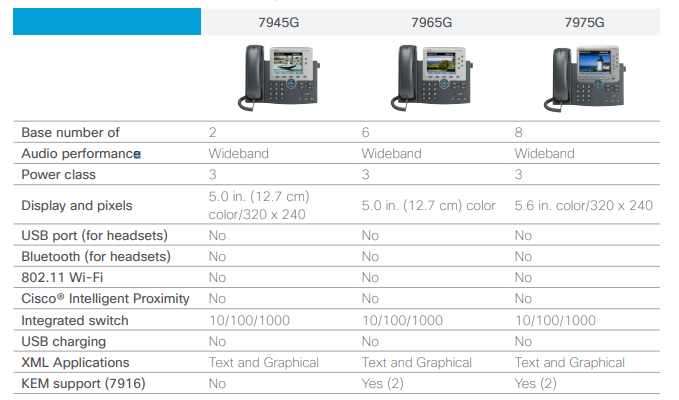
Cisco Phones Compared
Cisco 7900 seriesCisco 8800 seriesCisco 7800 series
Opens in a new window.
test
Aden
AI headset advisor
Hi! 👋 Looking for the right headset? I'll help you compare options for your setup.
Aden
AI headset advisor
How was this chat?
Chats may be recorded to improve service. See our Privacy Policy.
 Do you want the best headset?


 Option 1- WITHOUT EHS cable
 Cisco 8800 series
  Cisco 7800 series