Do you want the best headset?
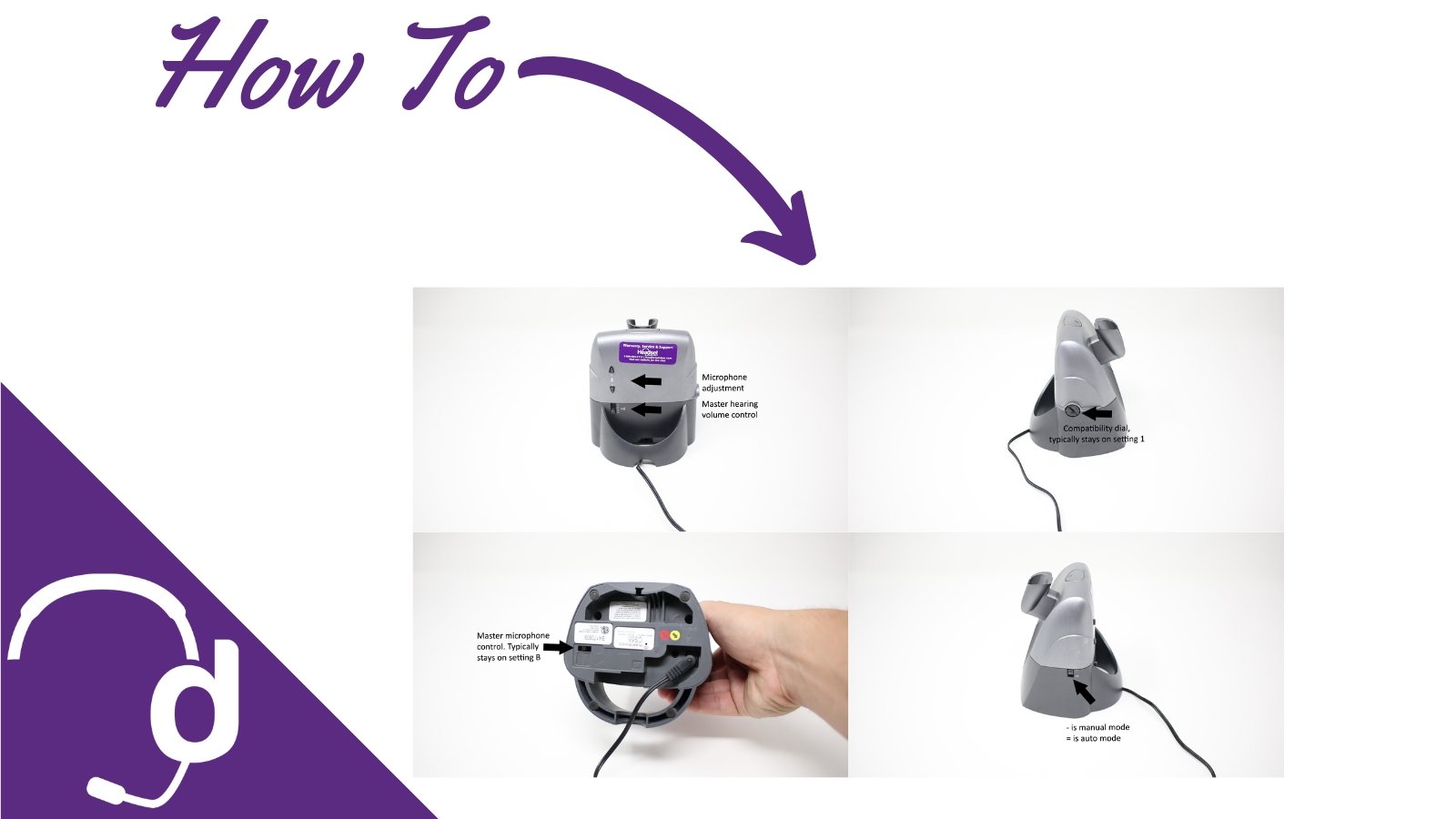
Headset Controls:
Keep in mind, out of the box the on/off button will not answer/end your calls when away from the phone, UNLESS you have the HL10 Lifter or EHS cable. Contact us today to verify compatibility. In addition, located in the back of your earpiece is the volume up/down control but it's also the mute/unmute button. If you press the volume button straight in towards the microphone, this will mute and unmute your microphone, which we use as our hold button when away from the desk.

Charging base controls:
Manual mode means, when you first take your headset out of the charging base, your headset won't automatically turn on. When in auto mode, each time you first take your headset out of the charging base, it will automatically turn your headset on for you.  Your microphone control is located on the back of your charging base, and if you need additional hearing volume, you'll see the WiFi looking symbol which will adjust how loud you hear your callers. The standard setting is 3 (1 is loudset and 4 is lowest).
The compatibility dial is located on your Plantronics charging base and you'll see numbers 1-4. 1 is the standard setting but some desk phone require you to adjust this setting in order to hear a clear dial tone.  Located on the bottom of your CS50 or CS55 charging base is a control labeled A-D. This will give you another adjustment of microphone volume but should typically stay on setting B.
Other helpful resources:
- Plantronics CS50 and CS55 battery replacement guide
- Yealink EHS36 setup with Plantronics CS55
- Plantronics CS55 setup guide- headset port
- Plantronics CS55 setup guide for phones without headset port
The Plantronics CS50 wireless headset is renowned for its excellent sound quality and user-friendly design, making it a top choice for professionals. Whether you're setting up the Plantronics CS50 base station or exploring the Plantronics CS50 headset's compatibility with different devices, this model offers seamless integration and reliable performance. Understanding the controls on the Plantronics CS50 with its charging base can further enhance your experience, ensuring you get the most out of your communication setup