Do you want the best headset?

In today’s workplace, it’s common for employees to use multiple communication devices throughout the day. A typical workflow might include a computer for Teams or Zoom meetings, a desk phone for incoming calls, and a mobile phone for on-the-go communication.
While this setup is normal, it often leads to an overlooked challenge—managing multiple headsets. Switching between devices, juggling connections, and maintaining separate equipment can create inefficiencies that add up over time.
Fortunately, there’s a smarter solution: multi-device headsets.
The Traditional Approach: One Headset Per Device
In many offices, employees use separate headsets for different devices. A wired headset may be connected to a computer, while a different headset is used for a desk phone or mobile device.


This approach can work, but it introduces several drawbacks:
-
Increased equipment costs from purchasing multiple headsets
-
More accessories and cables to manage
-
Time lost switching between devices
-
Inconsistent audio experiences across different headsets
Wired headsets, in particular, are typically designed for single-device use. While they are simple and reliable, they lack the flexibility needed in environments where users frequently move between communication platforms. If you’re weighing the pros and cons, our guide on wired vs wireless headsets breaks down the key differences in more detail.
In some cases, adapters may allow a wired headset to connect to different devices, but this can add complexity—and may not always be compatible with every setup.
The Smarter Alternative: Multi-Device Wireless Headsets

Multi-device wireless headsets are designed to eliminate these challenges by allowing one headset to connect to multiple devices at the same time.
These headsets typically support connections to:
-
Computers via USB (USB-A or USB-C)
-
Desk phones through a base station
-
Mobile phones using Bluetooth
With this setup, users can seamlessly switch between devices without unplugging cables or changing headsets. The result is a more streamlined and efficient workflow.
For example, you might be on a video meeting through your computer when a desk phone call comes in. With a multi-device headset, you can answer the call without removing your headset or disrupting your workflow.
Why This Matters in Real-World Use
The value of a multi-device headset becomes clear in everyday scenarios.
Consider a typical workday:
-
You start with a Teams or Zoom meeting on your computer
-
A desk phone call comes in that needs immediate attention
-
Later, you receive a call on your mobile phone
Without a multi-device solution, this could mean switching between two or even three different headsets.
With a multi-device headset, you can handle all of these interactions with a single device. This reduces friction, saves time, and helps maintain focus throughout the day.
A Standout Example: Yealink HA64 Pro

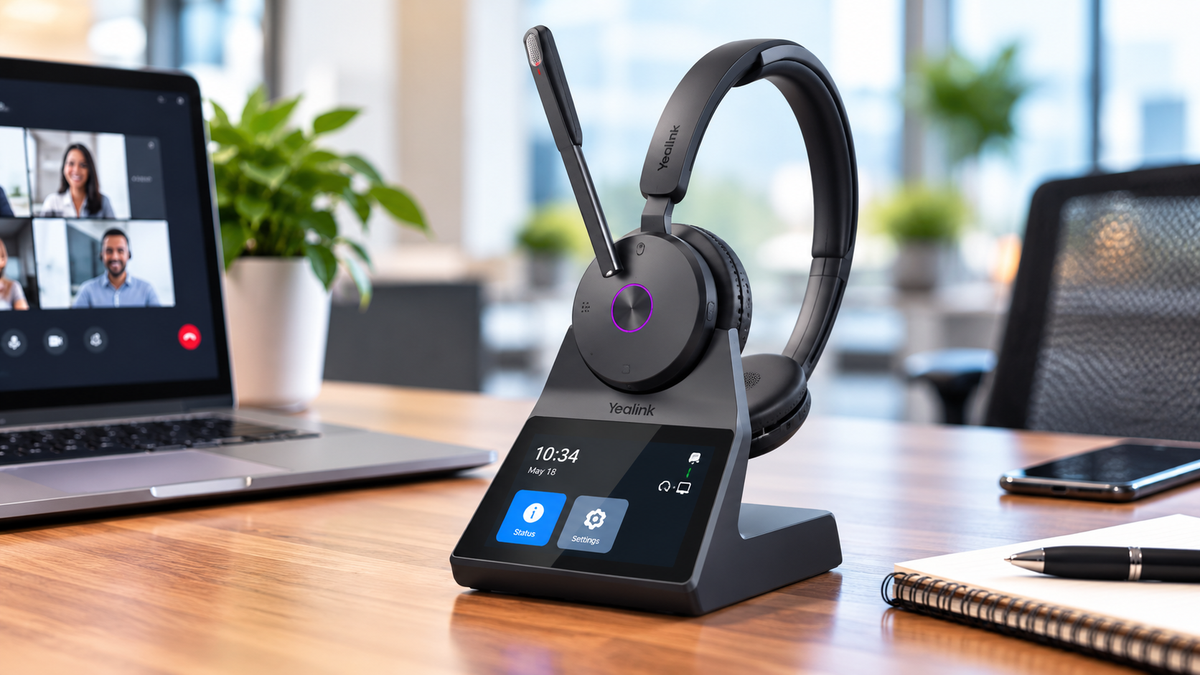
One example of a multi-device headset that stands out is the Yealink HA64 Pro.
Like other professional wireless headsets, it can connect to a computer and desk phone through its base. However, what makes it unique is how it handles mobile connectivity.
In many wireless headset systems, Bluetooth is built into the base station. This means you need to remain within range of the base to use your mobile phone with the headset.
The Yealink HA64 Pro takes a different approach. It includes Bluetooth directly in the headset itself.
This allows you to:
-
Leave your desk while staying connected to your mobile phone
-
Walk outside or move freely around your workspace
-
Continue conversations without being tied to the base
This added flexibility can be a major advantage for users who need true mobility throughout their day.
To see how the Yealink HA64 Pro performs in real-world use, watch our video where David demonstrates its features, sound quality, noise cancellation, and wireless range.
Cost Considerations: One vs Multiple Headsets

At first glance, wireless multi-device headsets may appear more expensive than wired options. However, it’s important to look at the total cost of ownership.
If your current setup requires:
-
One headset for your computer
-
Another for your desk phone
-
Possibly a third for mobile use
The combined cost can quickly approach, or even exceed, the price of a single multi-device wireless headset.
In addition to cost savings, using one headset instead of several also reduces:
-
Maintenance and replacement needs
-
Inventory management complexity
-
Vendor coordination for support and troubleshooting
Over time, this can simplify operations and lower overall overhead.
Wired vs Wireless in Multi-Device Environments

Wired headsets still have their place. They are typically:
-
More affordable upfront
-
Simple to deploy (plug and play)
-
Reliable for single-device use
However, they are not designed for multi-device flexibility.
Wireless headsets, while requiring slightly more setup, offer significant advantages when multiple devices are involved. The ability to switch between sources without disconnecting or changing equipment makes them a better fit for modern, multi-platform workflows.
In short, wired headsets work well for static environments, while wireless headsets excel in dynamic ones.
Productivity, Convenience, and Peace of Mind
When employees don’t have to think about switching devices or managing multiple headsets, they can focus more on their work.
Multi-device headsets help improve:
-
Efficiency by reducing interruptions
-
Convenience by simplifying workflows
-
Consistency by providing a uniform audio experience
These benefits may seem small individually, but over time they can have a meaningful impact on productivity and user satisfaction, especially across an enterprise.
Making the Right Choice

Choosing the right headset ultimately comes down to how your team works.
A multi-device headset is a strong fit if:
-
Employees regularly switch between devices
-
Mobility and flexibility are important
-
You want to reduce equipment complexity
-
You’re looking for a long-term, scalable solution
For organizations that rely on multiple communication platforms, investing in a multi-device solution can simplify operations and improve the overall experience.
 If you’re unsure which headset is best for your environment, or want to explore options like the Yealink HA64 Pro, contact us at Headset Advisor. Our trained Advisors can provide expert guidance and help you find a solution tailored to your exact needs.