Do you want the best headset?
In busy contact centers and shared work environments, headsets are among the most heavily used pieces of equipment in the workplace.
Employees may wear them for hours at a time, day after day, and in some cases, like dispatch centers for example, sharing them across multiple shifts and users may not be uncommon. Yet despite how frequently headsets are used, headset hygiene is often overlooked until ear cushions begin deteriorating, microphone covers start disintegrating, or employees begin complaining about comfort and cleanliness.
Good headset hygiene practices aren’t simply about how the ear cushions or mic screens look. They can help support healthier work environments, improve employee comfort, and help to extend the life of headset equipment..
For organizations using shared headsets or maintaining large headset deployments, a proactive hygiene strategy can make a difference.
Why Headset Hygiene Matters

Headsets come into direct contact with:
- skin
- hair
- ears
- hands
- facial oils
- moisture
Over time, those daily interactions naturally wear down headset materials.
Whether headsets are shared or not, they’re generally used heavily throughout the day and can lead in many cases to close skin contact.
Without proper maintenance, it’s not uncommon to see:
- cracked or deteriorating ear cushions
- worn microphone wind screens
- buildup on headbands and ear tips
- foam materials beginning to break apart
- unpleasant odors from older accessories
Over the years, we’ve personally seen headsets still in active use where large portions of the foam ear cushions and microphone wind screens were literally missing due to material breakdown.
Not only can this affect comfort and professionalism, but deteriorating accessories can also make equipment harder to clean and maintain properly, not to mention hygiene.
Body Oils Naturally Break Down Foam Materials

One reason headset accessories wear out over time is simple everyday skin contact.
Foam ear cushions and microphone wind screens are constantly exposed to:
- skin oils
- perspiration
- cosmetics
- hair products
- general daily wear
Over time, these materials naturally begin to deteriorate.
This is one reason many headset manufacturers recommend replacing foam ear cushions and microphone wind screens approximately every six months under normal use conditions.
For high-use contact center environments, replacement intervals may need to happen even sooner depending on usage levels.
Shared Headsets Require Additional Attention

Shared headset environments introduce additional hygiene challenges because multiple employees may use the same equipment throughout the day or week.
In these situations, businesses should strongly consider implementing practices such as:
- disinfecting headsets between shifts
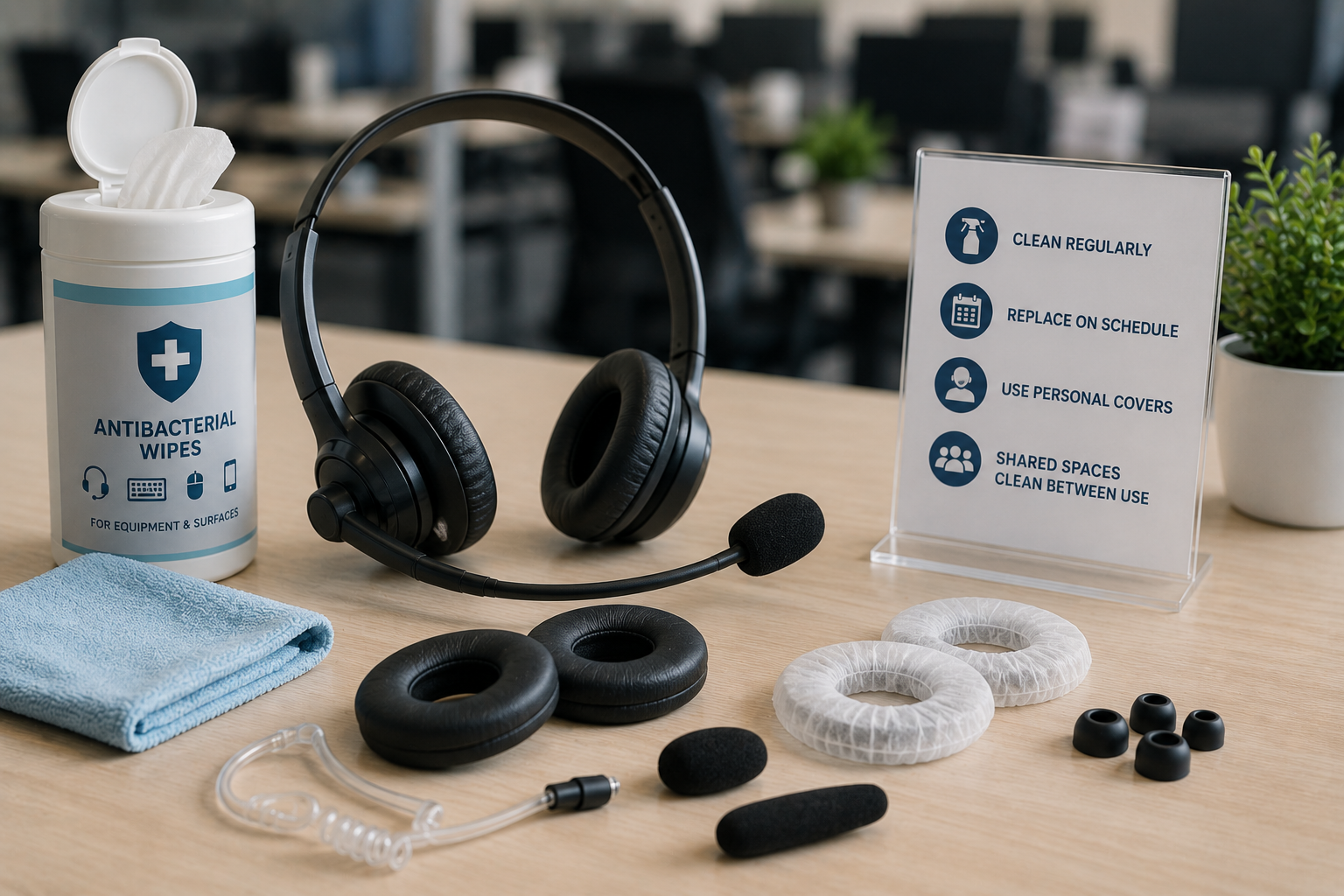
- providing employees with personal ear cushions and wind screens if applicable
- using disposable ear cushion covers
- Periodic sanitizing of peripheral equipment like phones, computers etc.
Disposable ear cushion covers can be especially helpful in shared environments. Employees simply place the disposable covers over the ear cushions during their shift, then remove and discard them afterward.
This creates a clean barrier between users while also helping extend the life of the original ear cushions underneath.
Don’t Forget About Ear Tips and Ear Gels

Some headset models use ear gels or ear tips that sit directly inside the ear canal.
These accessories deserve special attention because of their close contact with the ear itself.
Regular cleaning and scheduled replacement of ear gels and ear tips can help maintain better hygiene and improve overall comfort for users. In shared environments, it’s often best for employees to have their own individually assigned ear tips whenever possible.
This is especially important in contact centers where headsets may rotate between multiple employees.
Headbands Need Attention Too
When people think about headset hygiene, they often focus only on ear cushions and microphones.
But some headsets also contain padded headbands that come into regular contact with hair, skin, and perspiration.
Like ear cushions, these materials can also deteriorate over time.
Regular wipe downs are important, but if the headband padding, or the headband itself is replaceable, businesses should consider including those components in periodic refresh cycles as well.
Older Headsets May Have Additional Replaceable Parts

Some older contact center headsets used a voice tube or sound tube microphone system instead of modern noise canceling microphones.
Examples include older Plantronics models such as the H41 and H51, along with certain legacy Jabra headset models that utilized replaceable sound tube tips.
These headsets used:
- clear plastic voice tubes with mesh screen on the end in the case with older Plantronics models.
- Small, black replaceable microphone tips for applicable Jabra models
If these older headsets are still in use, periodically replacing those components can help improve cleanliness and maintain clear audio quality.
Daily Cleaning Can Go a Long Way
One of the simplest and most effective hygiene practices is regular cleaning.
Using antibacterial or disinfecting wipes approved for electronics can help remove oils, dirt, and surface contaminants from:
- ear cushions
- microphone booms
- headbands
- headset buttons
- cords and connectors
Many businesses also apply similar cleaning routines to:
- keyboards
- mice
- desktop phones
- shared workstations
When done consistently, these small maintenance habits can help support a cleaner work environment overall, and help to avoid the spread of germs.
Proper Microphone Positioning Helps Too

For headsets using foam microphone wind screens, employees should avoid:
- talking directly into the microphone
- placing the microphone directly against the side of the face
- allowing the wind screen to constantly rub against skin
- Avoid having the microphone pointed in the wrong direction
Instead, users should speak slightly over the microphone rather than directly into it.
Not only does this generally improve audio quality, but it also helps reduce moisture and oil exposure that can accelerate foam deterioration. It also helps to avoid the popping sound when saying words with “P” in them when the mic is too close to the mouth.
For more tips on improving microphone positioning and overall call clarity, check out our related blog: Poor Headset Audio? Your Microphone Position Could Be the Problem.
A Simple Maintenance Schedule Can Help
Rather than waiting until headset accessories are visibly deteriorating, businesses may benefit from establishing a simple preventative maintenance schedule.
A proactive approach can help:
- improve employee comfort
- maintain a more professional appearance
- reduce emergency replacement needs
- simplify budgeting for accessories
- support cleaner shared workspaces
Even basic routines like scheduled wipe downs and regular accessory replacement intervals can make a difference over time.
Headset Hygiene Also Supports Employee Comfort

Clean headsets don’t just look better. They generally feel better to wear too.
Fresh ear cushions, clean microphone covers, and properly maintained accessories can help improve comfort during long shifts, especially for employees spending hours each day on calls.
In shared environments, visible cleanliness also helps reassure employees that the equipment they’re using is being properly maintained.
For some employees, especially those more sensitive to hygiene concerns, these practices can make shared headset environments feel significantly more comfortable and professional.
Final Thoughts
Headset hygiene may not always receive the same attention as headset features, compatibility, or wireless range, but in contact centers and shared workspaces, it’s an important part of maintaining a healthier and more comfortable work environment.
Regular cleaning, scheduled accessory replacement, and thoughtful shared headset practices can help support employee comfort, improve professionalism, extend equipment life, and create a better overall experience for employees using headsets every day.
And in many cases, relatively small preventative steps can help avoid much larger problems later.
Have Questions Or Need Some Help?

Whether you’re replacing headset accessories, managing a shared headset environment, or evaluating new headset solutions for your contact center, Headset Advisor is here to help.
With over 30 years of experience and more than 800 five-star Google reviews, we help businesses find practical communication solutions that improve comfort, productivity, and long-term value.
Contact us today, and let one of our headset experts provide you with a tailored solution that’s guaranteed to be compatible with your system.