Do you want the best headset?
5 Signs You Need to Upgrade Your Office Headset
Your headset is more than just a tool - it’s your lifeline to clear communication and productivity. If you’re constantly dealing with poor audio, discomfort, or outdated features, it might be holding you back. Here’s how to know if it’s time to upgrade:
- Audio Issues: Muffled sound, static, or a microphone that doesn’t perform reliably can waste time and hurt your professional image.
- Physical Discomfort: Headaches, sore ears, or neck strain during long workdays could signal poor design or outdated ergonomics.
- Outdated Connectivity: Struggling to switch between devices or limited wireless range makes your workflow inefficient.
- Declining Battery Life: Frequent recharging or sudden shutdowns disrupt your day and lower productivity.
- Missing Features: Lack of modern tools like noise cancellation technology, platform integration, or hearing protection can impact both performance and safety.
If your current headset shows any of these signs, upgrading to a modern model like the Yealink HA64 Pro can make a big difference. It offers superior sound, better comfort, multi-device connectivity, extended battery life, and advanced features designed for today’s hybrid work environments.
Quick Comparison
| Feature | Older Models (e.g., Poly CS540) | Modern Models (e.g., Yealink HA64 Pro) |
|---|---|---|
| Audio Quality | Basic, prone to issues | Clear, noise-canceling microphones |
| Comfort | Heavy, poor padding | Lightweight, memory foam cushions |
| Connectivity | Limited | Triple device support |
| Battery Life | Short (~7 hours) | Long (up to 32 hours) |
| Features | Minimal | Busy lights, touchscreen, hearing protection |
Upgrading ensures you stay productive, comfortable, and professional in every call or meeting. Don’t let an outdated headset hold you back.
Avoid These Business Headset Buying Mistakes (Before You Waste Money)
sbb-itb-0686a5f
1. Poor Sound Quality and Unreliable Microphone Performance
One of the clearest signs that your headset has seen better days? When you constantly hear phrases like "Can you repeat that?" or "You're cutting out," despite having a rock-solid internet connection. These recurring issues often point to your headset as the culprit. Let’s break down the specific audio problems that signal your headset may be on its last legs.
Audio issues typically manifest in a few key ways: sound that’s muffled or tinny, constant static or crackling, voices that unpredictably spike or fade, and a microphone that makes you sound far away or robotic. These disruptions aren’t just frustrating - they waste time. A 2020 EPOS survey revealed that employees lose up to 29 minutes per week due to poor audio quality, resulting in misunderstandings and technical hiccups that slow down communication. The same study highlighted that 87% of decision-makers believe improving audio quality could directly boost productivity.
"Bad sound quality can make conversations difficult, and it can erode your self image, and that of your company, product or service." - Headset Advisor
Microphone issues can also harm your professional image. When your mic picks up background noise like keyboard clicks, HVAC hums, or office chatter, it gives the impression that you’re not in control of your environment. In roles like sales or customer support - where first impressions matter - this can leave a lasting negative impact.
To pinpoint whether your headset is the problem, try recording yourself during normal use and ask a coworker for feedback. Compare their observations with what you hear in the recording. If the issues persist across different apps and devices, it’s likely your headset - not the software - that’s underperforming. Modern professional headsets tackle these problems with features like wideband/HD audio, noise canceling office headsets, and digital connections (USB or DECT) that offer far more reliable performance than older analog models. And while audio quality is a major factor, it’s just one piece of the puzzle when it comes to effective communication.
2. Discomfort and Fatigue During Long Workdays
Your headset might be doing more harm than you realize if you’re wrapping up your workday with headaches, sore ears, or a stiff neck. Even if the audio quality is fine, physical discomfort can quietly chip away at your productivity. Often, these aches are brushed off as the result of "just a long day", but they might actually point to a poor headset design.
The main offenders? Excessive clamping force, insufficient padding, and weight. A headset that presses too tightly can cause headaches or even migraines over time. Hard plastic ear cushions can quickly turn uncomfortable during long use. And if your headset weighs close to 10 ounces, it can strain your neck during an 8-hour shift. Ideally, a stereo headset should weigh no more than 6 ounces. For instance, the Yealink HA64 Pro Duo is a lightweight option at just 5.3 ounces (151g).
Poor ergonomics don’t just cause discomfort - they also disrupt focus. Adjusting a headset that doesn’t fit right or struggling to hear muffled audio can break your concentration, often for up to 20 minutes at a time. Multiply that by several instances throughout the day, and the lost focus adds up quickly.
"If you, or your team spend hours each day on calls, an uncomfortable headset can lead to: Fatigue, Distraction, Headaches, Reduced productivity, Absenteeism." - Headset Advisor
Modern headsets are tackling these issues with features like adjustable headbands, pivoting ear cups, and memory foam cushioning that molds to the shape of your ear instead of pressing against it. For warmer environments, look for models with perforated or cooling gel cushions, which help reduce heat buildup. And no matter what headset you choose, replacing ear cushions every six months ensures they maintain their shape and comfort.
Recognizing these signs of discomfort early can help you select a headset that not only feels better but also keeps you efficient throughout your workday. Ignoring ergonomic issues can have a lasting impact on your performance and well-being.
3. Outdated Connectivity and Limited Device Compatibility
If your headset only connects to one device, it’s already falling behind. Today’s office workers often switch between a computer, desk phone, and mobile device throughout the day. With an older headset, you’re stuck physically swapping cables or reaching for a different device every time you change communication channels. This disrupts workflow and makes communication less efficient.
"Switching between devices and managing separate equipment creates inefficiencies." - Headset Advisor
Take the Poly CS540, for example. It connects solely to desk phones, and if you want PC support, you’ll need to buy an additional USB adapter for around $50.00. Compare that to modern options like the Yealink HA64 Pro (~$259.99), which offers triple connectivity right out of the box. This means it can seamlessly connect to your PC, desk phone, and mobile device at the same time. With this kind of setup, you can easily switch from a Teams meeting on your computer to an incoming call on your mobile without any hassle.
Wireless range is another area where older headsets fall short. Standard Bluetooth typically works only within 30–50 feet in real-world conditions. Meanwhile, today’s DECT technology can provide a range of over 600 feet, even in environments filled with other wireless devices. The Yealink HA64 Pro integrates both DECT and Bluetooth directly into the headset (not just the base station), so you’ll stay connected to your mobile device even if you step away from your desk.
Platform compatibility is equally important. If your headset isn’t certified for platforms like Microsoft Teams or Zoom, you might lose out on features like remote call answering, one-touch mute, or the ability to launch meetings directly from your headset. Certified devices ensure these features work without extra effort.
When your headset limits connectivity, range, or platform integration, it’s time to consider an upgrade. Modern headsets not only simplify device management but also improve communication efficiency across the board.
4. Declining Battery Life or Frequent Technical Issues
Inconsistent battery performance can be a real headache, especially when you're in the middle of a busy workday. Imagine your headset dying mid-call - it's not just frustrating, it can completely disrupt your workflow. If you notice your headset frequently dropping calls or shutting down unexpectedly, it could be a sign that the battery is wearing out under regular use.
Short battery life isn't just inconvenient; it can also add hidden costs. Having to recharge your headset during a shift means downtime, which impacts productivity and adds complexity to your routine.
"Battery surprises are never welcome, especially if you're in the middle of an important call." - Doug Merritt, Headset Advisor
As headsets age, technical hiccups like audio dropouts, static, or distorted, robotic sounds often creep in. These issues are typically linked to battery degradation or wireless interference, both of which can severely affect call quality and reliability. Maintaining a reliable battery is crucial to meet the communication demands of modern professional environments. If your headset is a few years old, replacing the battery can cost anywhere from $50.00 to $100.00 per unit.
Thankfully, newer budget wireless headsets for calls are designed to tackle these problems head-on with longer battery life and faster charging options. Take the Yealink HA64 Pro (~$259.99), for example. It offers an impressive 32 hours of talk time, far outlasting older models that average around 13 hours. Plus, its fast-charging base can deliver a 40% charge in just 30 minutes, and a full recharge takes only 90 minutes. Even better, it supports use while charging, so you won't have to interrupt your work to power up.
"The Yealink HA64 Pro allows you to continue using the headset while it's plugged in for a recharge. As simplistic as this might sound, you may be surprised to know that a lot of headsets are unable to do this." - Doug Merritt, Headset Advisor
5. Missing Modern Collaboration Features and Hearing Protection
Older headsets were designed for a time when work meant a single desk phone and one connection. But today, the workplace is a mix of tools like Microsoft Teams, Zoom, and hybrid meetings - all of which demand smooth transitions between devices. Unfortunately, older models often fall short in keeping up with this dynamic setup.
One major issue is the lack of unified communications (UC) compatibility. Modern headsets certified for platforms like Teams or Zoom come with built-in controls for mute, volume, and call management. These features work seamlessly, ensuring you don’t encounter frustrating glitches like one-way audio or unresponsive buttons after a software update. Without these certifications, you’re more likely to face those dreaded "Can you hear me?" moments.
Another overlooked feature in older headsets is the absence of visual indicators, like integrated busy lights. In open offices or busy home settings, a visible status light can prevent interruptions during important calls. As Doug Merritt from Headset Advisor explains:
"Interruptions are known to degrade productivity, and increase frustration." - Doug Merritt, Headset Advisor
For example, the Yealink HA64 Pro addresses this need with a built-in busy light, triple connectivity (PC, desk phone, and mobile), and a 3.5-inch touchscreen that lets users adjust settings without relying on IT-restricted software. Features like these go beyond convenience - they enhance both focus and productivity.
But it’s not just about collaboration; hearing protection is another critical area where older headsets fall short. According to NIOSH, around 22 million U.S. workers are exposed to potentially harmful noise levels at work annually, and 12% of those already face hearing issues. Modern headsets now include features like acoustic shock protection and automatic volume leveling. These prevent sudden loud noises and keep audio at safe levels, ensuring long-term use doesn’t harm your hearing. Without these safeguards, prolonged headset use could expose you to unsafe sound levels, putting your hearing at risk.
Comparison Table
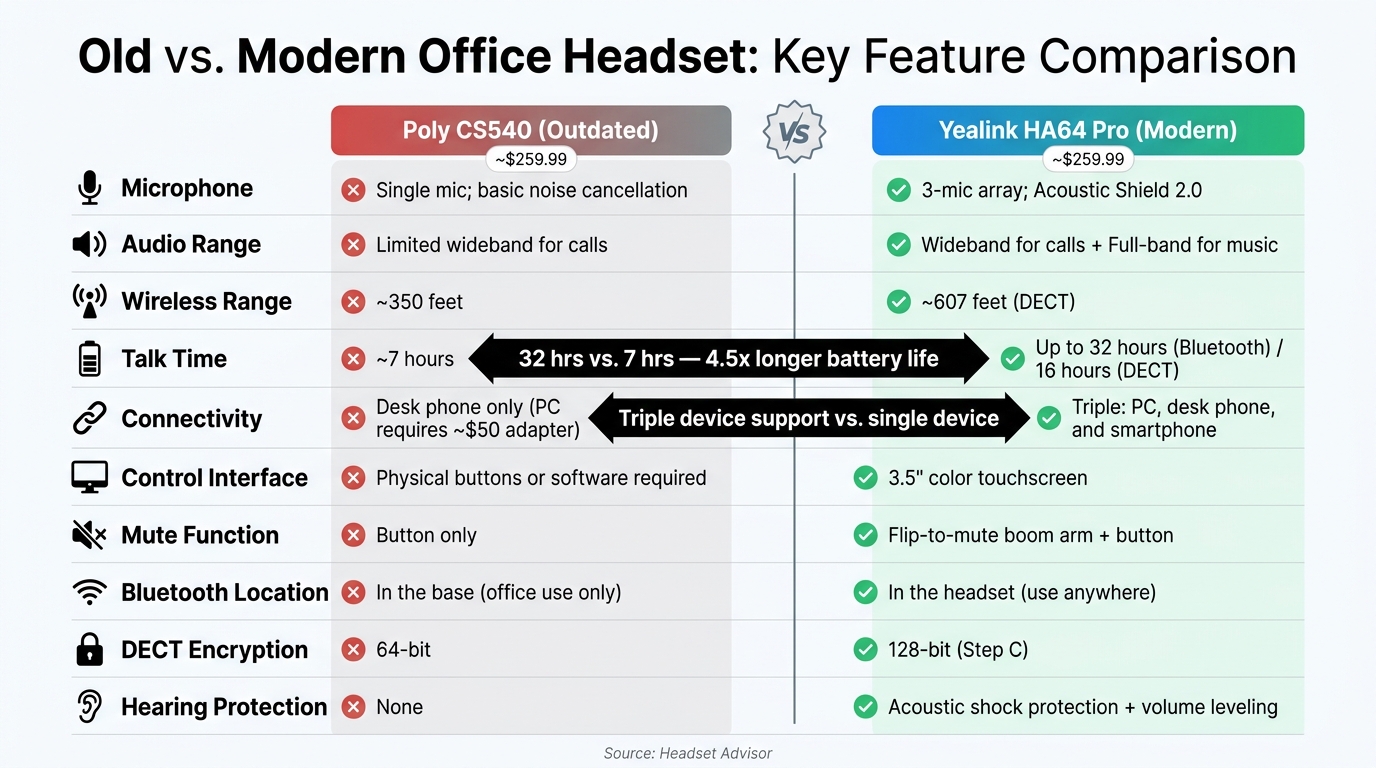
Old vs. Modern Office Headset: Feature Comparison
The table below sheds light on the differences between an older headset model, the Poly CS540, and a more advanced option, the Yealink HA64 Pro (priced at $259.99). These comparisons align with the key points discussed earlier, providing a clear look at how the two stack up.
| Feature | Poly CS540 (Outdated) | Yealink HA64 Pro (Modern) |
|---|---|---|
| Microphone | Single mic; basic noise cancellation | 3-mic array; Acoustic Shield 2.0 (see how it compares to Poly Acoustic Fence) |
| Audio Range | Limited wideband for calls | Wideband for calls; Full-band for music |
| Wireless Range | ~350 feet | ~607 feet (DECT) |
| Talk Time | ~7 hours | Up to 32 hours (Bluetooth) / 16 hours (DECT) |
| Connectivity | Desk phone only (PC requires ~$50 adapter) | Triple: PC, desk phone, and smartphone |
| Control Interface | Physical buttons or software required | 3.5" color touchscreen |
| Mute Function | Button only | Flip-to-mute boom arm + button |
| Bluetooth Location | In the base (office use only) | In the headset (use anywhere) |
| DECT Encryption | 64-bit | 128-bit (Step C) |
| Hearing Protection | None | Acoustic shock protection + volume leveling |
The Yealink HA64 Pro clearly outshines the Poly CS540 in almost every category. For instance, talk time jumps from around 7 hours to up to 32 hours with Bluetooth, while wireless range nearly doubles, reaching approximately 607 feet. The HA64 Pro also supports connections to three devices simultaneously, eliminating the need for additional adapters - unlike the Poly CS540, which requires extra spending for PC connectivity.
Doug Merritt from Headset Advisor emphasizes the importance of these upgrades:
"The Yealink HA64 Pro provides peace of mind so you don't have to worry about poor audio quality, or dropping calls because every word matters, and your image is on the line." - Doug Merritt, Headset Advisor
With features like enhanced audio clarity, extended battery life, and versatile connectivity, the HA64 Pro offers a clear advantage for professionals who rely on their headsets for seamless communication. The outdated Poly CS540 simply can't compete in terms of efficiency or performance.
Conclusion
If you're noticing even a handful of these daily issues, your headset might be holding you back. Whether it's audio glitches or ergonomic discomfort, these problems highlight one thing: your headset may no longer meet the demands of modern communication. Poor sound quality and an uncomfortable fit can sap your focus and productivity, while outdated connectivity creates frustrating barriers when switching between devices.
These challenges add up, disrupting your workflow and communication. Think about it - are colleagues frequently asking you to repeat yourself? Does your headset feel like a burden after a long day? Or does it struggle to handle multiple devices seamlessly? If you answered yes to any of these, it might be time to explore how to choose the right headset for your needs.
Take a look at the comparison table provided earlier. If your current headset is missing features that newer models, like the Yealink HA64 Pro, offer, it could be costing you more than you realize - in both efficiency and peace of mind. Research even shows that poor audio quality can lead to up to 29% of meeting content being misunderstood or missed.
Upgrading doesn't have to be overwhelming. Review your current device against these five warning signs, pinpoint the features that matter most for your work - whether that's superior comfort, multi-device connectivity, or seamless integration with Teams and Zoom - and start narrowing down your choices. A carefully selected headset is a small price to pay compared to the ongoing frustration of missed calls, garbled audio, and end-of-day exhaustion.
Your headset represents your voice in every professional interaction. It should empower your communication, not work against it. Make the switch today to ensure every call, meeting, and conversation is as smooth and effective as possible.
FAQs
How can I tell if my headset or my internet is causing call issues?
To figure out what's causing the issue, start by determining if it happens on all calls. If it does, the problem might be with your headset or connection. If the issue gets worse during calls, network congestion could be the culprit. Try using a wired connection or switching to a different headset. If that fixes the problem, it’s likely your wireless connection or headset causing trouble. Additionally, check if the issue is just affecting you (a local issue) or if it’s impacting everyone (a network-wide problem).
What headset features matter most for hybrid work and multi-device switching?
For hybrid work and switching between multiple devices, focus on native multi-device connectivity. This ensures you can connect to computers, desk phones, and mobile devices at the same time. Opt for wireless options like DECT for strong, long-range connections and Bluetooth for added flexibility. Features like touchscreens for easy device switching and dedicated UC platform buttons for call control can make daily tasks more efficient. Also, check that your headset integrates smoothly with your softphone platforms to maintain seamless audio and call handling.
How do I know if my headset is protecting my hearing on long calls?
To keep your hearing safe during extended calls, it's smart to opt for headsets that include audio optimization features. Take the Yealink HA64 Pro, for instance - it has a touchscreen equalizer that lets you tweak sound settings to suit your comfort. Using high-quality, professional equipment with consistent and clear audio can help you avoid ear fatigue, which is often caused by subpar sound quality. Also, make sure your device settings are correctly adjusted to ensure a safe and pleasant listening experience.